 The NIG Supercomputer
advance reservation
Overview
Advance Reservation is a service that users reserve a certain range of resources in the Grid Engine queue before using and can use exclusively the reserved area.
Note: this service is a billing service, so you must submit a usage plan before you use it.
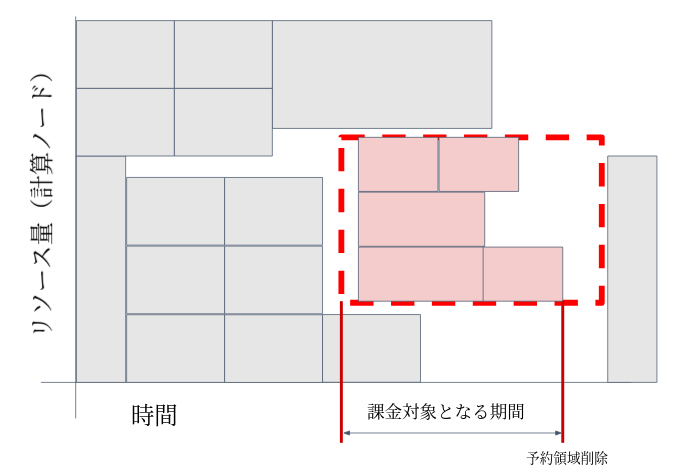
The red dotted square shows the resources taken by the advance reservation (number of slots on the compute nodes ✕ usage time) and the other squares show the resources occupied by the job (number of slots used on compute nodes ✕ calculation time). The user who reserved the area can submit the job to the red square area.
(Users using the Advance Reservation Service can submit as usual jobs without using the reserved quota for computational resources by using the qsub command as well as users not using the Advance Reservation Service.)
About the billing period
- When you get the reserved quota for computational resources and delete it before the end time after start using, the time from the start time to the delet time of it is subject to billing.(Normally this pattern)
- When you didn't delet the reserved quota, all the time from the start time to the end time is subject to billing.
- When it is the end time of the reserved quota, the job is forcibly terminated even if the job is running.
- All the reserved quota is subject to billing even if you don't execute the job on the reserved quota.
- When you get the reserved quota for computational resources and delete it before the start time of it, it becomes invalid and is not subject to billing.
Instruction for using Advance Reservation Service
To use the Advance Reservation Service, follow the steps below.
- Submit the usage plan
- This service is a billing service and you must submit a usage plan before you start using it. Refer to "How to use billing service" for more information on its process.
- Get the reserved quota for computational resources
- To get the reserved quota for computational resources using the
QRSUBcommand.
- To get the reserved quota for computational resources using the
- Confirm the reserved quota for computational resources
- To confirm the reserved quota of computational resources using the
qrstatcommand.
- To confirm the reserved quota of computational resources using the
- Execute jobs
- To execute jobs after getting the reserved quota for computational resources using the
qsubcommand by specifyingar-id(reservation number) with the-aroption.
- To execute jobs after getting the reserved quota for computational resources using the
- Delet the reserved quota for computational resources
- To delet the reserved quota for computational resources using the
QRDELcommand.
- To delet the reserved quota for computational resources using the
The QRSUB and QRDEL commands are wrapper programs for Grid Engine's qrsub and qrdel commands created to calculate billing on the NIG supercomputer.
Both QRSUB and QRDEL command options are available for the qrsub and qrdel commands, respectively.
for the options of each command, refer to the Grid Engine User's Manual (English only).
How to get the reserved quota for computational resources
When you get the reserved quota, you can ask supercomputer SE to reserve it, or you can reserve it yourself with the command.
It may not be possible to get it with QRSUB because there are no available resources depending on the running job.
In such a case, move the date and time to be reserved it to a future date and time, and execute the QRSUB command again.
Execution example (1)
When you get the reserved quota for computer resorces using medium.q with one node, 4GB of memory, 3 slots, from April 2, 13:15, 2020 to May 4, 10:00, 2020, the memory is allocated 12GB (GB of memory x 3 slots). In getting it, you need available memory for it.
QRSUB -l medium -l mem_req=4G -l s_vmem=4G -pe def_slot 3 -a 202004021315 -e 202005041000
-l medium:Specify medium.q-l mem_req=4G -l s_vmem=4G:Specify 4GB of memory-pe def_slot 3:Specify 3 slots (Number of slots requested is reserved by 1 node)-a 202004021315:Specify the start using time at 13:15 on April 2, 2020-e 202005041000:Specify the end to use time at 10:00 on May 4, 2020
Execution example (2)
When you get the reserved quota for computer resorces using medium.q with the mpi job (parallel number is 2~5) that spans multiple nodes, 4GB of memory, 3 slots, from October 10, 00:00 to October 20, 7:05, the memory is allocated 12GB (GB of memory x 3 slots). In getting it, you need available memory for it.
QRSUB -l medium -pe mpi 2-10 -a 10100000 -e 10200705
-pe mpi 2-5: Specify minimum number of parallelism 2, maximum number of parallelism 5 on the mpi job-a 10100000: Specify the start using time at 13:15 on October 10-e 10200705: Specify the end to use time at 7:05 on October 20
*The memory is not specified, so the specified memory is considered the default value.
Execution Result
When the QRSUB command completes successfully, you will get the following message and a ar-id (4-digit reservation number) is issued.
Your advance reservation XXXX has been granted
XXXX : ar-id(reservation number).
When the QRSUB command does not complete successfully, check the specified options and try again.
How to specify the reservation start time and end time
Specify the reservation start time and end time using the following arguments with the QRSUB command.
-a start-timeSpecifies the reservation start time. Specify "start-time" in the following format.-e end-timeSpecifies the end time which reserved. Specify "end-time" in the following format.
To specify the time, use in the following format.
- CCYYMMDDhhmm.SS
- CCYYMMDDhhmm
- YYMMDDhhmm.SS
- YYMMDDhhmm
- MMDDhhmm.SS
- MMDDhhmm -
*CC:the first two digits of the year YY:the last two digits of the year MM:Month DD:Date hh:Time mm:Min SS:Sec
How to check the status that you got the reserved quota
List the status that you got the reserved quota
qrstat
Execution result
ar-id      name       owner        state start at             end at               duration
------------------------------------------------------------------------------------------
      0001            test-user   w     10/10/2017 00:00:00  10/20/2017 07:05:00  247:05:00
      0002            test-user   r     01/10/2017 00:00:00  10/20/2017 00:00:00  6792:00:00
- ar-id:the reservation number
- state:the status of the reserved quota
- w: waiting without error, W: warning (waiting with error), r: running, E: error (running with error)
- start at:the start using time of the reserved quota
- end at:the end to use time of the reserved quota
- duration:the reservation time
Display details of the status that you got the reserved quota
qrstat -ar ar-id[,ar-id,ar-id・・・・]
- ar-id:the reservation number
- To check the acquisition status of reserved slots for multiple computing resources, specify reservation numbers separated by commas (,).
Execution Result
--------------------------------------------------------------------------------
id                             0001
name
owner                          test-user
state                          w
start_time                     10/10/2017 00:00:00.000
end_time                       10/20/2017 07:05:00.000
duration                       247:05:00.000
project
message                        XXXXXXXXXX
submission_time                03/22/2017 14:56:47.314
group                          test
account                        sge
resource_list                  month=TRUE, medium=TRUE, mem_req=3.1G, s_vmem=3.1G
free_resources                 false
reserve_available_only         true
granted_slots_list             month_medium.q@nm5i=1,month_medium.q@nm6i=1,month_medium.q@nm7i=1
granted_parallel_environment   mpi slots 2-3
--------------------------------------------------------------------------------
id                             0002
name
owner                          test-user
state                          r
start_time                     01/10/2017 00:00:00.000
end_time                       01/20/2017 00:00:00.000
duration                       6792:05:00.000
project
message                        XXXXXXXXXX
submission_time                01/05/2017 13:23:20.001
group                          test
account                        sge
resource_list                  mem_req=3.1G, s_vmem=3.1G
free_resources                 false
reserve_available_only         true
granted_slots_list             month_hdd.q@nt013i=1
--------------------------------------------------------------------------------
id                             0003
name
owner                          test-user1
state                          w
start_time                     01/01/2018 00:00:00.000
end_time                       01/02/2018 00:00:00.000
duration                       24:00:00.000
project
message                        XXXXXXXXXX
submission_time                04/03/2017 10:50:10.285
group                          test
account                        sge
resource_list                  mem_req=10G, s_vmem=10G
free_resources                 false
reserve_available_only         true
granted_slots_list             month_ssd.q@nt060i=3
granted_parallel_environment   def_slot slots
- ar-id:the reservation number
- state:the status of the reserved quota
- w: waiting without error, W: warning (waiting with error), r: running, E: error (running with error)
- start at:the start using time of the reserved quota
- end at:the end to use time of the reserved quota
- duration:the reservation time
- message: Error message (displayed only if state is W and E)
- resource_list: reserved acquisition queue names, amount of memory, etc.
- granted_slots_list: the reserved queue name, the node name and number of slots
- granted_parallel_environment: number of slots (displayed only when -pe option is specified)
How to execute the job
Specify ar-id (reservation number) with the -ar option of the qsub command, and execute the job.
For options, see the Grid Engine page.
If you execute the qsub command with ar-id before the start time of the reserved slot of the computational resource and submit the job, the job is executed as soon as the start time of the reserved slot comes.
Note that the executing job will be forced quit when the end time of the acquired reserved slot has passed.
Delete the reserved slot for computational resources
Execute the QRDEL command with ar-id (reserved number) to delete the reserved slot for computational resources.
Example:
QRDEL ar-id
Note: If "⑤ delet the reserved quota for computational resources (QRDEL command)" is executed while a job is running, the running job will also be terminated.