 NIG Supercomputer
Rの使い方
この記事では、遺伝研スパコン上でのR環境のユーザ環境へのインストール方法、パッケージ管理の利用方法について説明します。 以下の項目について説明します。
- OSディストリビューション付属のRを使う方法
- ソースコードからRをビルドしてユーザ環境にインストールする方法
- condaでRをインストールする方法
- renv を利用したR分析環境の管理
- パッケージマネージャspackを用いる方法
- (参考)Rを高速化する方法
について説明します。
OSディストリビューション付属のRを使う方法
ubuntu22.04を導入している計算ノードでは、Ubuntu22.04付属のRをインストール済みです。 Rとコマンドを入力すればR環境が立ち上がりますので、ご利用ください。
username@at138:~$ R

R version 4.1.2 (2021-11-01) -- "Bird Hippie"
Copyright (C) 2021 The R Foundation for Statistical Computing
Platform: x86_64-pc-linux-gnu (64-bit)

R is free software and comes with ABSOLUTELY NO WARRANTY.
You are welcome to redistribute it under certain conditions.
Type 'license()' or 'licence()' for distribution details.

R is a collaborative project with many contributors.
Type 'contributors()' for more information and
'citation()' on how to cite R or R packages in publications.

Type 'demo()' for some demos, 'help()' for on-line help, or
'help.start()' for an HTML browser interface to help.
Type 'q()' to quit R.

>
2024年2月現在、インストールされているRのバージョンは4.1.2(2021-11-01)になります。
またubuntu 22.04に付属しているr-cranのパッケージはインストールされています。
apt search r-cran
でインストールされているパッケージ群について参照してください。またインストールされている パッケージ群については、Rを起動後に
library()
と入力することで、R環境から利用可能なライブラリを確認することができます。
その他必要なライブラリについては、本ページ内に記載のいずれかの方法(renvなど)でユーザ環境に個別に導入可能です。
tarball からRをインストールする方法
R Networkからソースコードをダウンロードしてビルド、ユーザホームディレクトリ下にインストールして利用する方法です。
以下を実行することで$HOME/local/の下に R 処理系がインストールされます。
R の最新のソースコード(tarball)についてはThe Comprehensive R Archive Networkなどを参照してくだい。
mkdir -p ~/local/src
cd ~/local/src
# Install R
R_VERSION=4.3.2
R_MAJOR=4
wget https://cran.ism.ac.jp/src/base/R-${R_MAJOR}/R-${R_VERSION}.tar.gz
tar xzvf R-${R_VERSION}.tar.gz
cd R-${R_VERSION}

./configure --prefix=$HOME/local
make
make install
condaでRをインストールする方法
ここでは、minicondaを利用して、R環境をインストールする手順について説明します。 miniconda自体のインストール方法については、「pythonの使い方」内のMinicondaを参照してください。
minicondaをインストールして、condaコマンドが利用可能になったら、以下のコマンド群を投入します。
condaの場合、Rの複数のバージョン毎に仮想環境を作成して切り替えて使い分けるというような利用方法が可能になります。
以下のコマンドでチャネル上で使用可能なRのバージョンを確認します。
conda search -c conda-forge r-base
以下のように利用可能なバージョン群が表示されます。
yxxxx@at139:~$ conda search -c conda-forge r-base
Loading channels: done
# Name                       Version           Build  Channel
r-base                         3.3.1               1  pkgs/r

(中略)

r-base                         4.3.2      hb8ee39d_1  conda-forge
r-base                         4.3.2      hb8ee39d_2  conda-forge
利用したいRのバージョンの環境を作成します。
R-4.3.2という名前でR環境を作成します。ここでは4.3.2は単に例で、ユーザが利用したいバージョンを指定してください。
xxxx@at139:~$ conda create -n R-4.3.2 -y -c conda-forge r-base=4.3.2

Looking for: ['r-base=4.3.2']

(中略)

conda-forge/linux-64                                32.4MB @  48.6MB/s  0.7s
Transaction

  Prefix: /home/xxxx/miniconda3/envs/R-4.3.2

  Updating specs:

   - r-base=4.3.2


  Package                           Version  Build                Channel           Size
──────────────────────────────────────────────────────────────────────────────────────────
  Install:
──────────────────────────────────────────────────────────────────────────────────────────

  + font-ttf-dejavu-sans-mono          2.37  hab24e00_0           conda-forge      397kB
  + font-ttf-inconsolata              3.000  h77eed37_0           conda-forge       97kB

  (中略)

  + r-base                            4.3.2  hb8ee39d_2           conda-forge       26MB

  Summary:

  Install: 88 packages

  Total download: 184MB

──────────────────────────────────────────────────────────────────────────────────────────


font-ttf-inconsolata                                96.5kB @   1.0MB/s  0.1s
(中略)
libstdcxx-devel_linux-64                            13.0MB @   8.5MB/s  0.4s
sysroot_linux-64                                    15.3MB @   9.7MB/s  0.3s
binutils_impl_linux-64                               5.4MB @   3.1MB/s  0.3s

Downloading and Extracting Packages:

Preparing transaction: done
Verifying transaction: done
Executing transaction: done

To activate this environment, use

     $ conda activate R-4.3.2

To deactivate an active environment, use

     $ conda deactivate
r-base=4.3.2 という記述がバージョンを指定してインストールすることを意味します。
Rの環境をactivateします。
conda activate R-4.3.2
プロンプトに(R-4.3.2)という文字が付加されることを確認します。r-essentialsを追加インストールします。
conda install -c conda-forge r-essentials
インストールが開始されます。反応に時間がかかります。
Channels:
 - conda-forge
 - defaults
Platform: linux-64
Collecting package metadata (repodata.json): done
Solving environment: done

## Package Plan ##

  environment location: /home/yxxxx/miniconda3/envs/R-4.3.2

  added / updated specs:
    - r-essentials


The following packages will be downloaded:

    package                    |            build
    ---------------------------|-----------------
    anyio-4.2.0                |     pyhd8ed1ab_0          99 KB  conda-forge

  (中略)

    zipp-3.17.0                |     pyhd8ed1ab_0          19 KB  conda-forge
    ------------------------------------------------------------
                                           Total:       202.4 MB

The following NEW packages will be INSTALLED:

  anyio              conda-forge/noarch::anyio-4.2.0-pyhd8ed1ab_0

  (中略)

  zipp               conda-forge/noarch::zipp-3.17.0-pyhd8ed1ab_0
進めるかを確認されるので、yを入力します。
Proceed ([y]/n)? y
インストールが開始されます。
Downloading and Extracting Packages:

Preparing transaction: done
Verifying transaction: done
Executing transaction: done
(R-4.3.2) xxxx@at137:~$
プロンプトが返ってきたら、R(4.3.2)が起動することを確認します。
(R-4.3.2) xxxx@at137:~$ R

R version 4.3.2 (2023-10-31) -- "Eye Holes"
Copyright (C) 2023 The R Foundation for Statistical Computing
Platform: x86_64-conda-linux-gnu (64-bit)

R is free software and comes with ABSOLUTELY NO WARRANTY.
You are welcome to redistribute it under certain conditions.
Type 'license()' or 'licence()' for distribution details.

R is a collaborative project with many contributors.
Type 'contributors()' for more information and
'citation()' on how to cite R or R packages in publications.

Type 'demo()' for some demos, 'help()' for on-line help, or
'help.start()' for an HTML browser interface to help.
Type 'q()' to quit R.

>
R環境から抜ける場合は、q()を入力します。
q()
condaの仮想環境から抜けるには、conda deactivate を実行します。
conda deactivate
通常のシェル環境に戻ります。 仮想環境に多重に入っている場合は、シェルに抜けるまで、conda deactivateを実行してください。
一回、Rの仮想環境をインストールした後、次回以降は
conda env list
で以前作成した仮想環境のリストを確認して、activateしたい仮想環境を conda activateして、Rを起動してください。
conda環境でのサブコマンドについては、開発元の以下のドキュメントを参照してください。
Rの仮想環境がインストールできましたら、R上のパッケージ管理は、以下のrenvを利用してください。
renv を利用したR分析環境の管理
renvは、positが開発支援しているRのパッケージ管理の為のオープンソースパッケージです。Rでの分析環境の再現性を担保することを目的として開発されています。
- renvのgithubのページ https://rstudio.github.io/renv/
- renv利用のGettiing Started https://rstudio.github.io/renv/articles/renv.html
- renvの関数リファレンス https://rstudio.github.io/renv/reference/index.html
R環境上でのrenvを利用した解析作業の流れは以下のようになります。
- renv::init()を実行する。
- Rコードを書く。必要なパッケージをrenvを使ってインストールする。
- 作業過程でrenv::snapshot()を適宜行う。ロックファイルに保存する。
- 分析作業を終えたら、renv::snapshot()をして、編集したファイルとrenv/とrenv.lockファイルを外部リポジトリにgit commitして保存する。
この作業手順により解析環境をリポジトリに保存しながら、解析環境を再現することが可能になります。以下にrenvの各関数とシステムライブラリ、プロジェクトライブラリ、ロックファイルの関係を纏めた図を示します。
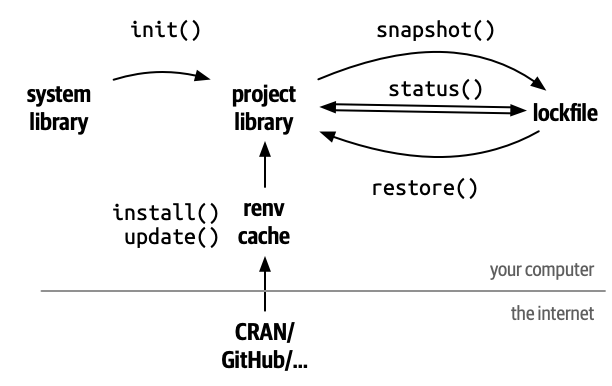
主なrenv関数は以下のようになります。
| renv関数 | 意味 | オンラインマニュアル |
|---|---|---|
| renv::init() | パッケージ管理開始(ホームディレクトリ直下では無く、作業用ディレクトリを作成して作業用ディレクトリ上で実行する。そうでないとエラーになる場合がある) | renv::init |
| renv::install() | パッケージインストール | renv::install |
| renv::status() | インストール状況確認コマンド | renv::status |
| renv::snapshot() | インストール状況記録 | renv::snapshot |
| renv::restore() | renv.lockファイルから状態を再現する | renv::restore |
| renv::history() | コミット履歴の参照 | renv::history |
| renv::revert() | histroyのcommit履歴を用いてrenv.lockを復旧する | renv::revert |
| renv::update() | プロジェクトライブラリをアップデートする | renv::update |
renvのインストール
R環境でrenvパッケージをインストールするには以下のようにします。
> install.packages("renv")
Installing package into ‘/home/yxxxx/R/x86_64-pc-linux-gnu-library/4.3’
(as ‘lib’ is unspecified)
trying URL 'https://p3m.dev/cran/__linux__/jammy/latest/src/contrib/renv_1.0.4.tar.gz'
Content type 'binary/octet-stream' length 2102571 bytes (2.0 MB)
==================================================
downloaded 2.0 MB

* installing *binary* package ‘renv’ ...
* DONE (renv)

The downloaded source packages are in
	‘/tmp/Rtmp6nfjdw/downloaded_packages’

>
renvパッケージを呼び出して利用可能にします。
> library(renv)

Attaching package: ‘renv’

The following objects are masked from ‘package:stats’:

    embed, update

The following objects are masked from ‘package:utils’:

    history, upgrade

The following objects are masked from ‘package:base’:

    autoload, load, remove

>
インストールされたrenvのバージョンを確認します。
> print(packageVersion("renv"))
[1] ‘1.0.4’
>
上記の流れでrenvパッケージが適用されました。
実行例
以下は、RStudio Serverのコンソール上での実行例です。プロジェクトはrenv-testという名称で作成しています。ホームディレクトリ直下でrenv::init()を 実行するとエラーになりますので、プロジェクトを作成してからプロジェクトディレクトリの中でinitを実施してください。
> renv::init()
The following package(s) will be updated in the lockfile:

# RSPM -----------------------------------------------------------------------
- renv   [* -> 1.0.4]

The version of R recorded in the lockfile will be updated:
- R      [* -> 4.3.2]

- Lockfile written to "~/renv-test/renv.lock".

Restarting R session...

- Project '~/renv-test' loaded. [renv 1.0.4]
パッケージをインストールしてみます。
> install.packages("tidyr")
# Downloading packages -------------------------------------------------------
- Downloading tidyr from CRAN ...               OK [1.1 Mb in 1.3s]
- Downloading cli from CRAN ...                 OK [1.2 Mb in 0.96s]
- Downloading dplyr from CRAN ...               OK [1.4 Mb in 1.0s]
- Downloading generics from CRAN ...            OK [74.5 Kb in 0.93s]
- Downloading glue from CRAN ...                OK [146.4 Kb in 0.96s]
- Downloading lifecycle from CRAN ...           OK [120.5 Kb in 0.93s]
- Downloading rlang from CRAN ...               OK [1.5 Mb in 1.1s]
- Downloading magrittr from CRAN ...            OK [215.9 Kb in 0.93s]
- Downloading pillar from CRAN ...              OK [631.4 Kb in 0.97s]
- Downloading fansi from CRAN ...               OK [300.6 Kb in 1.1s]
- Downloading utf8 from CRAN ...                OK [143.4 Kb in 0.94s]
- Downloading vctrs from CRAN ...               OK [1.2 Mb in 0.94s]
- Downloading R6 from CRAN ...                  OK [80.6 Kb in 0.97s]
- Downloading tibble from CRAN ...              OK [656.1 Kb in 0.95s]
- Downloading pkgconfig from CRAN ...           OK [17.2 Kb in 1.0s]
- Downloading tidyselect from CRAN ...          OK [214.8 Kb in 0.93s]
- Downloading withr from CRAN ...               OK [232.4 Kb in 0.93s]
- Downloading purrr from CRAN ...               OK [477.1 Kb in 0.97s]
- Downloading stringr from CRAN ...             OK [298.1 Kb in 0.97s]
- Downloading stringi from CRAN ...             OK [3.1 Mb in 0.96s]
- Downloading cpp11 from CRAN ...               OK [273.7 Kb in 0.94s]
Successfully downloaded 21 packages in 26 seconds.

The following package(s) will be installed:
- cli        [3.6.2]
- cpp11      [0.4.7]
- dplyr      [1.1.4]
- fansi      [1.0.6]
- generics   [0.1.3]
- glue       [1.7.0]
- lifecycle  [1.0.4]
- magrittr   [2.0.3]
- pillar     [1.9.0]
- pkgconfig  [2.0.3]
- purrr      [1.0.2]
- R6         [2.5.1]
- rlang      [1.1.3]
- stringi    [1.8.3]
- stringr    [1.5.1]
- tibble     [3.2.1]
- tidyr      [1.3.1]
- tidyselect [1.2.0]
- utf8       [1.2.4]
- vctrs      [0.6.5]
- withr      [3.0.0]
These packages will be installed into "~/renv-test/renv/library/R-4.3/x86_64-pc-linux-gnu".

Do you want to proceed? [Y/n]: y
yと入力します。
# Installing packages --------------------------------------------------------
- Installing cli ...                            OK [installed binary and cached in 1.3s]
- Installing generics ...                       OK [installed binary and cached in 0.56s]
- Installing glue ...                           OK [installed binary and cached in 0.89s]
- Installing rlang ...                          OK [installed binary and cached in 1.4s]
- Installing lifecycle ...                      OK [installed binary and cached in 1.2s]
- Installing magrittr ...                       OK [installed binary and cached in 0.97s]
- Installing fansi ...                          OK [installed binary and cached in 0.92s]
- Installing utf8 ...                           OK [installed binary and cached in 0.7s]
- Installing vctrs ...                          OK [installed binary and cached in 1.4s]
- Installing pillar ...                         OK [installed binary and cached in 1.5s]
- Installing R6 ...                             OK [installed binary and cached in 0.7s]
- Installing pkgconfig ...                      OK [installed binary and cached in 0.64s]
- Installing tibble ...                         OK [installed binary and cached in 1.7s]
- Installing withr ...                          OK [installed binary and cached in 0.87s]
- Installing tidyselect ...                     OK [installed binary and cached in 0.95s]
- Installing dplyr ...                          OK [installed binary and cached in 1.9s]
- Installing purrr ...                          OK [installed binary and cached in 0.99s]
- Installing stringi ...                        OK [installed binary and cached in 0.96s]
- Installing stringr ...                        OK [installed binary and cached in 1.4s]
- Installing cpp11 ...                          OK [installed binary and cached in 1.2s]
- Installing tidyr ...                          OK [installed binary and cached in 1.6s]
Successfully installed 21 packages in 25 seconds.
パッケージがインストールされました。ここで、Rのコード編集作業を行います。終わったら、renv::snapshot()を実行します。
> renv::snapshot()
The following package(s) will be updated in the lockfile:

# CRAN -----------------------------------------------------------------------
- cli          [* -> 3.6.2]
- cpp11        [* -> 0.4.7]
- dplyr        [* -> 1.1.4]
- fansi        [* -> 1.0.6]
- generics     [* -> 0.1.3]
- glue         [* -> 1.7.0]
- lifecycle    [* -> 1.0.4]
- magrittr     [* -> 2.0.3]
- pillar       [* -> 1.9.0]
- pkgconfig    [* -> 2.0.3]
- purrr        [* -> 1.0.2]
- R6           [* -> 2.5.1]
- rlang        [* -> 1.1.3]
- stringi      [* -> 1.8.3]
- stringr      [* -> 1.5.1]
- tibble       [* -> 3.2.1]
- tidyr        [* -> 1.3.1]
- tidyselect   [* -> 1.2.0]
- utf8         [* -> 1.2.4]
- vctrs        [* -> 0.6.5]
- withr        [* -> 3.0.0]

Do you want to proceed? [Y/n]:
yと入力します。
- Lockfile written to "~/renv-test/renv.lock".
>
ロックファイルに書き込まれます。このrenv.lockファイルをgitリポジトリなどで管理すれば 他のホストや他のプロジェクトフォルダ上でrenv::restore()でライブラリ環境を復元する ことが可能になります。
パッケージマネージャ spack を用いる方法
spack はユーザー権限だけで使えるパッケージマネージャの1つです。
基本的な手順
spacke 自体のインストール手順の手順に従って spack パッケージマネージャをインストールしてください。
以下のコマンドを実行すると R 処理系が使えるようになります。
spack install r
spack load r
インストール方法の詳細
利用可能なパッケージの表示
R 処理系はパッケージ名も単にrなので、R関係の利用可能なパッケージの検索に工夫がいります。
spack list | grep ^r | lessを実行することで R 関連のパッケージを表示できます。
$ spack list | grep ^r | less
r
r-a4
r-a4base
r-a4classif
r-a4core
r-a4preproc
r-a4reporting
r-abadata
r-abaenrichment
r-abind
... (以下略)
利用可能なバージョンの表示
R 処理系本体のパッケージ名はrですのでspack info rを実行すると利用可能な R のバージョンを表示できます。
$ spack info r
AutotoolsPackage:   r

Description:
    R is 'GNU S', a freely available language and environment for
    statistical computing and graphics which provides a wide variety of
    statistical and graphical techniques: linear and nonlinear modelling,
    statistical tests, time series analysis, classification, clustering,
    etc. Please consult the R project homepage for further information.

Homepage: https://www.r-project.org

Preferred version:
    4.1.3    https://cloud.r-project.org/src/base/R-4/R-4.1.3.tar.gz

Safe versions:
    4.1.3    https://cloud.r-project.org/src/base/R-4/R-4.1.3.tar.gz
    4.1.2    https://cloud.r-project.org/src/base/R-4/R-4.1.2.tar.gz
    4.1.1    https://cloud.r-project.org/src/base/R-4/R-4.1.1.tar.gz
    4.1.0    https://cloud.r-project.org/src/base/R-4/R-4.1.0.tar.gz
    4.0.5    https://cloud.r-project.org/src/base/R-4/R-4.0.5.tar.gz
    4.0.4    https://cloud.r-project.org/src/base/R-4/R-4.0.4.tar.gz
    4.0.3    https://cloud.r-project.org/src/base/R-4/R-4.0.3.tar.gz
    4.0.2    https://cloud.r-project.org/src/base/R-4/R-4.0.2.tar.gz
    4.0.1    https://cloud.r-project.org/src/base/R-4/R-4.0.1.tar.gz
    4.0.0    https://cloud.r-project.org/src/base/R-4/R-4.0.0.tar.gz
    3.6.3    https://cloud.r-project.org/src/base/R-3/R-3.6.3.tar.gz
    3.6.2    https://cloud.r-project.org/src/base/R-3/R-3.6.2.tar.gz
    3.6.1    https://cloud.r-project.org/src/base/R-3/R-3.6.1.tar.gz
    3.6.0    https://cloud.r-project.org/src/base/R-3/R-3.6.0.tar.gz
    3.5.3    https://cloud.r-project.org/src/base/R-3/R-3.5.3.tar.gz
    3.5.2    https://cloud.r-project.org/src/base/R-3/R-3.5.2.tar.gz
    3.5.1    https://cloud.r-project.org/src/base/R-3/R-3.5.1.tar.gz
    3.5.0    https://cloud.r-project.org/src/base/R-3/R-3.5.0.tar.gz
    3.4.4    https://cloud.r-project.org/src/base/R-3/R-3.4.4.tar.gz
    3.4.3    https://cloud.r-project.org/src/base/R-3/R-3.4.3.tar.gz
    3.4.2    https://cloud.r-project.org/src/base/R-3/R-3.4.2.tar.gz
    3.4.1    https://cloud.r-project.org/src/base/R-3/R-3.4.1.tar.gz
    3.4.0    https://cloud.r-project.org/src/base/R-3/R-3.4.0.tar.gz
    3.3.3    https://cloud.r-project.org/src/base/R-3/R-3.3.3.tar.gz
    3.3.2    https://cloud.r-project.org/src/base/R-3/R-3.3.2.tar.gz
    3.3.1    https://cloud.r-project.org/src/base/R-3/R-3.3.1.tar.gz
    3.3.0    https://cloud.r-project.org/src/base/R-3/R-3.3.0.tar.gz
    3.2.5    https://cloud.r-project.org/src/base/R-3/R-3.2.5.tar.gz
    3.2.3    https://cloud.r-project.org/src/base/R-3/R-3.2.3.tar.gz
    3.2.2    https://cloud.r-project.org/src/base/R-3/R-3.2.2.tar.gz
    3.2.1    https://cloud.r-project.org/src/base/R-3/R-3.2.1.tar.gz
    3.2.0    https://cloud.r-project.org/src/base/R-3/R-3.2.0.tar.gz
    3.1.3    https://cloud.r-project.org/src/base/R-3/R-3.1.3.tar.gz
    3.1.2    https://cloud.r-project.org/src/base/R-3/R-3.1.2.tar.gz

Deprecated versions:
    None

Variants:
    ======================    ====    ==============    ==================================================

    X [off]                   --      on, off           Enable X11 support (TCLTK, PNG, JPEG, TIFF, CAIRO)
    external-lapack [off]     --      on, off           Links to externally installed BLAS/LAPACK
    memory_profiling [off]    --      on, off           Enable memory profiling
    rmath [off]               --      on, off           Build standalone Rmath library

Build Dependencies:
    blas   cairo  gnuconfig  icu4c  jpeg    libpng   libx11  libxt    pango  pcre2     tk  zlib
    bzip2  curl   harfbuzz   java   lapack  libtiff  libxmu  ncurses  pcre   readline  xz

Link Dependencies:
    blas   cairo  harfbuzz  java  lapack  libtiff  libxmu  ncurses  pcre   readline  xz
    bzip2  curl   icu4c     jpeg  libpng  libx11   libxt   pango    pcre2  tk        zlib

Run Dependencies:
    None
特定のバージョンをインストールしたい場合は以下のようにコマンドを実行します。
spack install r@4.0.5
spack load r@4.0.5
R 処理系のバージョン切り替え
現在インストールされているバージョンを確認します。
$ spack find r
==> 2 installed packages
-- linux-centos7-zen2 / intel@2021.4.0 --------------------------
r@4.0.5  r@4.1.3
使いたいバージョンをspack loadすればそのバージョンに切り替わります。
$ spack load r@4.0.5
$ R

R version 4.0.5 (2021-03-31) -- "Shake and Throw"
Copyright (C) 2021 The R Foundation for Statistical Computing
Platform: x86_64-pc-linux-gnu (64-bit)

R is free software and comes with ABSOLUTELY NO WARRANTY.
You are welcome to redistribute it under certain conditions.
Type 'license()' or 'licence()' for distribution details.

  Natural language support but running in an English locale

R is a collaborative project with many contributors.
Type 'contributors()' for more information and
'citation()' on how to cite R or R packages in publications.

Type 'demo()' for some demos, 'help()' for on-line help, or
'help.start()' for an HTML browser interface to help.
Type 'q()' to quit R.

> q()
Save workspace image? [y/n/c]: n

$ spack load r@4.1.3
$ R

R version 4.1.3 (2022-03-10) -- "One Push-Up"
Copyright (C) 2022 The R Foundation for Statistical Computing
Platform: x86_64-pc-linux-gnu (64-bit)

R is free software and comes with ABSOLUTELY NO WARRANTY.
You are welcome to redistribute it under certain conditions.
Type 'license()' or 'licence()' for distribution details.

  Natural language support but running in an English locale

R is a collaborative project with many contributors.
Type 'contributors()' for more information and
'citation()' on how to cite R or R packages in publications.

Type 'demo()' for some demos, 'help()' for on-line help, or
'help.start()' for an HTML browser interface to help.
Type 'q()' to quit R.

> q()

$
コンパイルオプションの調整
上記のspack info rの Variants の部分を見ると、デフォルトの状態では X window 関係のライブラリがリンクされておらず、グラフの画像出力ができない状態であることがわかります。
spack instalの際に以下のようにすることでコンパイルオプションを調整できます。(コンパイル時間はかなりかかるようになります。)
spack install r@4.0.5 X=True
アンインストール
以下のコマンドでパッケージのアンインストールができます。
spack uninstall r
spack 自体のアンインストールについてはspack 自体のインストール手順をご参照ください。
(参考)Rを高速化する方法
遺伝研スパコンでは、インテル oneAPI ベース & HPCツールキット マルチノード を導入しており、以下のものが利用可能です
- インテル oneAPI DPC++/C++ コンパイラ
- インテル MKL(マス・カーネル・ライブラリ)
これらを利用してソースコードのRをビルドして高速化することが可能な場合があります。ここではその方法について説明します。
コンパイラはGNUコンパイラを利用し、MKLをBLASライブラリとしてリンクしてRをビルドする方法
Intel MKLをBLASライブラリとしてリンクし、コンパイラとしては、gcc,gfortranを利用してRをビルドする方法について説明します。 以下のドキュメントを参考にして本項目は記載しています。
configureに利用する環境変数を設定します。ここでは上記のドキュメントのMKLのマルチスレッド対応のビルドの仕方に従っています。 シングルスレッド対応にしたい場合は、その点を読み替えてください。またここでは、CRANからR-4.3.2のソースコードパッケージをダウンロード して展開しています。
yxxxx@at138:~/R2/R-4.3.2$ export MKL="-L/lustre7/software/intel_ubuntu/oneapi/mkl/latest/lib/intel64 -lmkl_gf_lp64 -lmkl_core -lmkl_gnu_thread -dl -fopenmp"
yxxxx@at138:~/R2/R-4.3.2$ export MKL_INTERFACE_LAYER=GNU,LP64
yxxxx@at138:~/R2/R-4.3.2$ export MKL_THREADING_LAYER=GNU
上記の変数を利用してconfigureをかけます。またこの時に、libcurlやzlibやiconv部分でエラーが出る場合は、minicondaの中の当該ツールを参照して OS付属のものを見ていないことが疑われるので、conda環境を抜けて、ビルド時にminiconda環境を参照しないようにしてください。
yxxxx@at138:~/R2/R-4.3.2$ ./configure --with-blas="$MKL" --with-lapack --prefix=/home/yxxxx/R-4.3.2MKL
checking build system type... x86_64-pc-linux-gnu
checking host system type... x86_64-pc-linux-gnu
loading site script './config.site'
loading build-specific script './config.site'
checking for pwd... /usr/bin/pwd
checking whether builddir is srcdir... yes
checking whether ln -s works... yes
checking for ar... ar
checking for a BSD-compatible install... /usr/bin/install -c

(長いので省略)
またconfigure中で以下の部分でBLASの環境をチェックしているのでここで環境チェックがうまくいっていることを見ておいてください。
checking for dgemm_ in -L/lustre7/software/intel_ubuntu/oneapi/mkl/latest/lib/intel64 -lmkl_gf_lp64 -lmkl_core -lmkl_gnu_thread -dl -fopenmp... yes
checking whether double complex BLAS can be used... yes
checking whether the BLAS is complete... yes

(長いので省略)

R is now configured for x86_64-pc-linux-gnu

  Source directory:            .
  Installation directory:      /home/yxxxx/R-4.3.2MKL

  C compiler:                  gcc  -g -O2
  Fortran fixed-form compiler: gfortran  -g -O2

  Default C++ compiler:        g++ -std=gnu++17  -g -O2
  C++11 compiler:              g++ -std=gnu++11  -g -O2
  C++14 compiler:              g++ -std=gnu++14  -g -O2
  C++17 compiler:              g++ -std=gnu++17  -g -O2
  C++20 compiler:              g++ -std=gnu++20  -g -O2
  C++23 compiler:              g++ -std=gnu++23  -g -O2
  Fortran free-form compiler:  gfortran  -g -O2
  Obj-C compiler:

  Interfaces supported:        X11, tcltk
  External libraries:          pcre2, readline, BLAS(MKL), LAPACK(in blas), curl
  Additional capabilities:     PNG, JPEG, TIFF, NLS, cairo, ICU
  Options enabled:             R profiling

  Capabilities skipped:
  Options not enabled:         shared BLAS, memory profiling

  Recommended packages:        yes
上記でBLASがMKLになっていることを確認してください。
次にmakeします。エラーで中断しないことを確認します。
yxxxx@at138:~/R2/R-4.3.2$ make
make[1]: Entering directory '/lustre7/home/yxxxx/R2/R-4.3.2/m4'

(省略)

configuring Java ...
Java interpreter : /usr/bin/java
Java version     : 11.0.20.1
Java home path   : /usr/lib/jvm/java-11-openjdk-amd64
Java compiler    : /usr/bin/javac
Java headers gen.:
Java archive tool: /usr/bin/jar

trying to compile and link a JNI program
detected JNI cpp flags    : -I$(JAVA_HOME)/include -I$(JAVA_HOME)/include/linux
detected JNI linker flags : -L$(JAVA_HOME)/lib/server -ljvm
using C compiler: ‘gcc (Ubuntu 11.4.0-1ubuntu1~22.04) 11.4.0’
make[2]: Entering directory '/tmp/Rjavareconf.qqHvXL'
gcc -I"/home/yxxxx/R2/R-4.3.2/include" -DNDEBUG -I/usr/lib/jvm/java-11-openjdk-amd64/include -I/usr/lib/jvm/java-11-openjdk-amd64/include/linux  -I/usr/local/include    -fpic  -g -O2  -c conftest.c -o conftest.o
gcc -shared -L/usr/local/lib -o conftest.so conftest.o -L/usr/lib/jvm/java-11-openjdk-amd64/lib/server -ljvm
make[2]: Leaving directory '/tmp/Rjavareconf.qqHvXL'

JAVA_HOME        : /usr/lib/jvm/java-11-openjdk-amd64
Java library path: $(JAVA_HOME)/lib/server
JNI cpp flags    : -I$(JAVA_HOME)/include -I$(JAVA_HOME)/include/linux
JNI linker flags : -L$(JAVA_HOME)/lib/server -ljvm
Updating Java configuration in /home/yxxxx/R2/R-4.3.2
Done.
make installをかけます。
yxxxx@at138:~/R2/R-4.3.2$ make install
mkdir -p -- /home/yxxxx/R-4.3.2MKL/lib/R
make[1]: Entering directory '/lustre7/home/yxxxx/R2/R-4.3.2/m4'
make[1]: Nothing to be done for 'install'.
make[1]: Leaving directory '/lustre7/home/yxxxx/R2/R-4.3.2/m4'
make[1]: Entering directory '/lustre7/home/yxxxx/R2/R-4.3.2/tools'

(省略)

gcc -I. -I../../src/include -I../../src/include  -I/usr/local/include -DHAVE_CONFIG_H    -g -O2  -L/usr/local/lib -DR_HOME='"/home/yxxxx/R-4.3.2MKL/lib/R"' \
  -o Rscript ./Rscript.c
make[2]: Leaving directory '/lustre7/home/yxxxx/R2/R-4.3.2/src/unix'
make[2]: Entering directory '/lustre7/home/yxxxx/R2/R-4.3.2/src/main'
mkdir -p -- /home/yxxxx/R-4.3.2MKL/lib/R/bin/exec
make[3]: Entering directory '/lustre7/home/yxxxx/R2/R-4.3.2/src/main'
make[3]: Leaving directory '/lustre7/home/yxxxx/R2/R-4.3.2/src/main'
make[2]: Leaving directory '/lustre7/home/yxxxx/R2/R-4.3.2/src/main'
make[2]: Entering directory '/lustre7/home/yxxxx/R2/R-4.3.2/src/modules'
make[3]: Entering directory '/lustre7/home/yxxxx/R2/R-4.3.2/src/modules/internet'
mkdir -p -- /home/yxxxx/R-4.3.2MKL/lib/R/modules
make[3]: Leaving directory '/lustre7/home/yxxxx/R2/R-4.3.2/src/modules/internet'
make[3]: Entering directory '/lustre7/home/yxxxx/R2/R-4.3.2/src/modules/lapack'
make[3]: Leaving directory '/lustre7/home/yxxxx/R2/R-4.3.2/src/modules/lapack'
make[3]: Entering directory '/lustre7/home/yxxxx/R2/R-4.3.2/src/modules/X11'
make[3]: Leaving directory '/lustre7/home/yxxxx/R2/R-4.3.2/src/modules/X11'
make[2]: Leaving directory '/lustre7/home/yxxxx/R2/R-4.3.2/src/modules'
make[2]: Entering directory '/lustre7/home/yxxxx/R2/R-4.3.2/src/library'
mkdir -p -- /home/yxxxx/R-4.3.2MKL/lib/R/library
installing packages ...
  building HTML index ...
make[2]: Leaving directory '/lustre7/home/yxxxx/R2/R-4.3.2/src/library'
make[1]: Leaving directory '/lustre7/home/yxxxx/R2/R-4.3.2/src'
make[1]: Entering directory '/lustre7/home/yxxxx/R2/R-4.3.2/tests'
make[1]: Nothing to be done for 'install'.
make[1]: Leaving directory '/lustre7/home/yxxxx/R2/R-4.3.2/tests'
Rがターゲットディレクトリにインストールされていることを確認します。
yxxxx@at138:~/R-4.3.2MKL/bin$ pwd
/home/yxxxx/R-4.3.2MKL/bin
yxxxx@at138:~/R-4.3.2MKL/bin$ ls -l R
-rwxr-xr-x 1 yxxxx co-xxx 9162 Mar 16 10:07 R
yxxxx@at138:~/R-4.3.2MKL/bin$ ./R

R version 4.3.2 (2023-10-31) -- "Eye Holes"
Copyright (C) 2023 The R Foundation for Statistical Computing
Platform: x86_64-pc-linux-gnu (64-bit)

R is free software and comes with ABSOLUTELY NO WARRANTY.
You are welcome to redistribute it under certain conditions.
Type 'license()' or 'licence()' for distribution details.

R is a collaborative project with many contributors.
Type 'contributors()' for more information and
'citation()' on how to cite R or R packages in publications.

Type 'demo()' for some demos, 'help()' for on-line help, or
'help.start()' for an HTML browser interface to help.
Type 'q()' to quit R.
今回ビルドしたRはマルチスレッド動作をする為、環境変数のOMP_NUM_THREADS または MKL_NUM_THREADSで利用コア数を設定してからRを実行して下さい。あまり多数のコアを利用して動作させようとしても、CPU資源を膨大に利用しても並列動作のオーバーヘッドで却って性能が出なかったり、悪ければデッドロックに陥る場合もあります。問題の規模、プログラム動作を見ながら妥当と思えるコア数を指定するようにしてください。
MKLを使用した場合と使用しない場合の性能比較(参考)
以下に簡単なベンチマーク結果を示します。
複数のプログラムが動作する複数ユーザ共用のノード上で動作させているため、あくまで参考値になります。またMKLを利用しているRの方はMKL_NUM_THREADSを5としています。また利用しているRはバージョン4.3.2です。
MKLを利用しない場合(外部BLASを利用しない場合)
yxxxx@at139:~/R-4.3.2MKL/bin$ cat R-benchmark-25.R |~/R-plane/bin/R --slave
Loading required package: Matrix
Loading required package: SuppDists
Warning message:
In library(package, lib.loc = lib.loc, character.only = TRUE, logical.return = TRUE,  :
  there is no package called ‘SuppDists’
Warning messages:
1: In remove("a", "b") : object 'a' not found
2: In remove("a", "b") : object 'b' not found


   R Benchmark 2.5
   ===============
Number of times each test is run__________________________:  3

   I. Matrix calculation
   ---------------------
Creation, transp., deformation of a 2500x2500 matrix (sec):  0.497
2400x2400 normal distributed random matrix ^1000____ (sec):  0.338
Sorting of 7,000,000 random values__________________ (sec):  0.783333333333333
2800x2800 cross-product matrix (b = a' * a)_________ (sec):  10.3113333333333
Linear regr. over a 3000x3000 matrix (c = a \ b')___ (sec):  3.76533333333333
                      --------------------------------------------
                 Trimmed geom. mean (2 extremes eliminated):  1.13597509074229

   II. Matrix functions
   --------------------
FFT over 2,400,000 random values____________________ (sec):  0.186333333333332
Eigenvalues of a 640x640 random matrix______________ (sec):  0.592666666666664
Determinant of a 2500x2500 random matrix____________ (sec):  0.184666666666667
Cholesky decomposition of a 3000x3000 matrix________ (sec):  0.0586666666666673
Inverse of a 1600x1600 random matrix________________ (sec):  1.672
                      --------------------------------------------
                Trimmed geom. mean (2 extremes eliminated):  0.273209956216133

   III. Programmation
   ------------------
3,500,000 Fibonacci numbers calculation (vector calc)(sec):  0.175333333333332
Creation of a 3000x3000 Hilbert matrix (matrix calc) (sec):  0.184666666666667
Grand common divisors of 400,000 pairs (recursion)__ (sec):  0.147666666666666
Creation of a 500x500 Toeplitz matrix (loops)_______ (sec):  0.042666666666662
Escoufier's method on a 45x45 matrix (mixed)________ (sec):  0.307999999999993
                      --------------------------------------------
                Trimmed geom. mean (2 extremes eliminated):  0.168465829089985


Total time for all 15 tests_________________________ (sec):  19.2476666666667
Overall mean (sum of I, II and III trimmed means/3)_ (sec):  0.373931786643322
                      --- End of test ---
MKLを利用した場合
yxxxx@at139:~/R-4.3.2MKL/bin$ cat R-benchmark-25.R |./R --slave
Loading required package: Matrix
Loading required package: SuppDists
Warning message:
In library(package, lib.loc = lib.loc, character.only = TRUE, logical.return = TRUE,  :
  there is no package called ‘SuppDists’
Warning messages:
1: In remove("a", "b") : object 'a' not found
2: In remove("a", "b") : object 'b' not found


   R Benchmark 2.5
   ===============
Number of times each test is run__________________________:  3

   I. Matrix calculation
   ---------------------
Creation, transp., deformation of a 2500x2500 matrix (sec):  0.511333333333334
2400x2400 normal distributed random matrix ^1000____ (sec):  0.337666666666667
Sorting of 7,000,000 random values__________________ (sec):  0.799666666666667
2800x2800 cross-product matrix (b = a' * a)_________ (sec):  0.148666666666666
Linear regr. over a 3000x3000 matrix (c = a \ b')___ (sec):  0.107999999999999
                      --------------------------------------------
                 Trimmed geom. mean (2 extremes eliminated):  0.294986381459619

   II. Matrix functions
   --------------------
FFT over 2,400,000 random values____________________ (sec):  0.186
Eigenvalues of a 640x640 random matrix______________ (sec):  0.223666666666666
Determinant of a 2500x2500 random matrix____________ (sec):  0.0846666666666659
Cholesky decomposition of a 3000x3000 matrix________ (sec):  0.074333333333333
Inverse of a 1600x1600 random matrix________________ (sec):  0.120000000000001
                      --------------------------------------------
                Trimmed geom. mean (2 extremes eliminated):  0.123633325394564

   III. Programmation
   ------------------
3,500,000 Fibonacci numbers calculation (vector calc)(sec):  0.173999999999999
Creation of a 3000x3000 Hilbert matrix (matrix calc) (sec):  0.187000000000001
Grand common divisors of 400,000 pairs (recursion)__ (sec):  0.146000000000001
Creation of a 500x500 Toeplitz matrix (loops)_______ (sec):  0.0439999999999981
Escoufier's method on a 45x45 matrix (mixed)________ (sec):  0.235000000000003
                      --------------------------------------------
                Trimmed geom. mean (2 extremes eliminated):  0.168105234521273


Total time for all 15 tests_________________________ (sec):  3.38
Overall mean (sum of I, II and III trimmed means/3)_ (sec):  0.18302324510412
                      --- End of test ---
2倍程度の高速化はされていることがわかります。
IntelのコンパイラでRをコンパイルし、MKLをリンクしてRをビルドする方法
以下の資料を参考に、IntelコンパイラでRのソースコードを最適化レベル3でコンパイル、ビルドして、MKLとリンクする方法について説明します。
上記にも一部記述がありますが、最新のIntelコンパイラでは、-lmkl_sequentialを指定しないと動作チェック時にエラーが出てしまうことを遺伝研スパコン上でも確認しており、これを回避できていません。このオプションはスレッド並列動作をしないMKLライブラリを利用することを指示するオプションの為、並列動作の恩恵を受けることが現状できません。この為、あくまで参考までに-lmkl_sequentialを指定してビルドが通った時の作業手順について以下で説明します。
まず、準備のために、以下の環境変数を設定します。
CXX=icpx
FC=ifx
CC=icx
CFLAGS=-O3 -fp-model precise -Wall -Wstrict-prototypes
CXXFLAGS=-O3 -fp-model precise -Wall
FFLAGS=-O3 -fp-model precise -warn all,noexternals
LDFLAGS=-L/lustre7/software/intel_ubuntu/oneapi/compiler/2024.0/lib
C17FLAGS=-O3 -fp-model precise -Wall -Wno-strict-prototypes
MKL=-L/lustre7/software/intel_ubuntu/oneapi/mkl/2023.2.0/lib/intel64 -lmkl_intel_lp64 -lmkl_core -lmkl_sequential
FCFLAGS=-free -O3 -fp-model precise -warn all,noexternals
以下のようにconfigureをかけます。
yxxxx@at138:~/R2/R-4.3.2$ ./configure --with-blas="$MKL" --with-lapack --prefix=/home/yxxxx/R-Intel
checking build system type... x86_64-pc-linux-gnu
checking host system type... x86_64-pc-linux-gnu
loading site script './config.site'
loading build-specific script './config.site'
checking for pwd... /usr/bin/pwd
checking whether builddir is srcdir... yes
checking whether ln -s works... yes
checking for ar... ar

(省略)

checking for dgemm_ in -L/lustre7/software/intel_ubuntu/oneapi/mkl/2023.2.0/lib/intel64 -lmkl_intel_lp64 -lmkl_core -lmkl_sequential... yes
checking whether double complex BLAS can be used... yes
checking whether the BLAS is complete... yes

(省略)

R is now configured for x86_64-pc-linux-gnu

  Source directory:            .
  Installation directory:      /home/yxxxx/R-Intel

  C compiler:                  icx  -O3 -fp-model precise -Wall -Wstrict-prototypes
  Fortran fixed-form compiler: ifx  -O3 -fp-model precise -warn all,noexternals

  Default C++ compiler:        icpx -std=gnu++17  -O3 -fp-model precise -Wall
  C++11 compiler:              icpx -std=gnu++11  -O3 -fp-model precise -Wall
  C++14 compiler:              icpx -std=gnu++14  -O3 -fp-model precise -Wall
  C++17 compiler:              icpx -std=gnu++17  -O3 -fp-model precise -Wall
  C++20 compiler:              icpx -std=gnu++20  -O3 -fp-model precise -Wall
  C++23 compiler:              icpx -std=gnu++23  -O3 -fp-model precise -Wall
  Fortran free-form compiler:  ifx  -free -O3 -fp-model precise -warn all,noexternals
  Obj-C compiler:

  Interfaces supported:        X11, tcltk
  External libraries:          pcre2, readline, BLAS(MKL), LAPACK(in blas), curl
  Additional capabilities:     PNG, JPEG, TIFF, NLS, cairo, ICU
  Options enabled:             R profiling

  Capabilities skipped:
  Options not enabled:         shared BLAS, memory profiling

  Recommended packages:        yes
上記で、コンパイラは、GNUコンパイラではなくicpx、ifxが利用されていること、BLASがMKLとなっていることを確認してください。 makeをかけます。
yxxxx@at138:~/R2/R-4.3.2$ make
make[1]: Entering directory '/lustre7/home/yxxxx/R2/R-4.3.2/m4'
make[1]: Nothing to be done for 'R'.
make[1]: Leaving directory '/lustre7/home/yxxxx/R2/R-4.3.2/m4'
make[1]: Entering directory '/lustre7/home/yxxxx/R2/R-4.3.2/tools'
make[1]: Nothing to be done for 'R'.
make[1]: Leaving directory '/lustre7/home/yxxxx/R2/R-4.3.2/tools'
make[1]: Entering directory '/lustre7/home/yxxxx/R2/R-4.3.2/doc'
make[2]: Entering directory '/lustre7/home/yxxxx/R2/R-4.3.2/doc/html'
make[2]: Leaving directory '/lustre7/home/yxxxx/R2/R-4.3.2/doc/html'
make[2]: Entering directory '/lustre7/home/yxxxx/R2/R-4.3.2/doc/manual'
make[2]: Nothing to be done for 'R'.
make[2]: Leaving directory '/lustre7/home/yxxxx/R2/R-4.3.2/doc/manual'
make[1]: Leaving directory '/lustre7/home/yxxxx/R2/R-4.3.2/doc'
make[1]: Entering directory '/lustre7/home/yxxxx/R2/R-4.3.2/etc'
make[1]: Leaving directory '/lustre7/home/yxxxx/R2/R-4.3.2/etc'
make[1]: Entering directory '/lustre7/home/yxxxx/R2/R-4.3.2/share'
make[1]: Leaving directory '/lustre7/home/yxxxx/R2/R-4.3.2/share'
make[1]: Entering directory '/lustre7/home/yxxxx/R2/R-4.3.2/src'
make[2]: Entering directory '/lustre7/home/yxxxx/R2/R-4.3.2/src/scripts'
creating src/scripts/R.fe
make[3]: Entering directory '/lustre7/home/yxxxx/R2/R-4.3.2/src/scripts'
make[3]: Leaving directory '/lustre7/home/yxxxx/R2/R-4.3.2/src/scripts'
make[2]: Leaving directory '/lustre7/home/yxxxx/R2/R-4.3.2/src/scripts'
make[2]: Entering directory '/lustre7/home/yxxxx/R2/R-4.3.2/src/include'
config.status: creating src/include/config.h
config.status: src/include/config.h is unchanged
make[3]: Entering directory '/lustre7/home/yxxxx/R2/R-4.3.2/src/include/R_ext'
make[3]: Leaving directory '/lustre7/home/yxxxx/R2/R-4.3.2/src/include/R_ext'
make[2]: Leaving directory '/lustre7/home/yxxxx/R2/R-4.3.2/src/include'
make[2]: Entering directory '/lustre7/home/yxxxx/R2/R-4.3.2/src/extra'
make[3]: Entering directory '/lustre7/home/yxxxx/R2/R-4.3.2/src/extra/tre'
make[4]: Entering directory '/lustre7/home/yxxxx/R2/R-4.3.2/src/extra/tre'
making regcomp.d from regcomp.c
making regerror.d from regerror.c
making regexec.d from regexec.c
making tre-ast.d from tre-ast.c
making tre-compile.d from tre-compile.c
making tre-match-approx.d from tre-match-approx.c
making tre-match-backtrack.d from tre-match-backtrack.c
making tre-match-parallel.d from tre-match-parallel.c
making tre-mem.d from tre-mem.c
making tre-parse.d from tre-parse.c
making tre-stack.d from tre-stack.c
make[4]: Leaving directory '/lustre7/home/yxxxx/R2/R-4.3.2/src/extra/tre'
make[4]: Entering directory '/lustre7/home/yxxxx/R2/R-4.3.2/src/extra/tre'
icx -I. -I. -I../../../src/include -I../../../src/include -I/usr/local/include -DHAVE_CONFIG_H   -fiopenmp  -O3 -fp-model precise -Wall -Wstrict-prototypes  -c regcomp.c -o regcomp.o
icx -I. -I. -I../../../src/include -I../../../src/include -I/usr/local/include -DHAVE_CONFIG_H   -fiopenmp  -O3 -fp-model precise -Wall -Wstrict-prototypes  -c regerror.c -o regerror.o
icx -I. -I. -I../../../src/include -I../../../src/include -I/usr/local/include -DHAVE_CONFIG_H   -fiopenmp  -O3 -fp-model precise -Wall -Wstrict-prototypes  -c regexec.c -o regexec.o
icx -I. -I. -I../../../src/include -I../../../src/include -I/usr/local/include -DHAVE_CONFIG_H   -fiopenmp  -O3 -fp-model precise -Wall -Wstrict-prototypes  -c tre-ast.c -o tre-ast.o
icx -I. -I. -I../../../src/include -I../../../src/include -I/usr/local/include -DHAVE_CONFIG_H   -fiopenmp  -O3 -fp-model precise -Wall -Wstrict-prototypes  -c tre-compile.c -o tre-compile.o
icx -I. -I. -I../../../src/include -I../../../src/include -I/usr/local/include -DHAVE_CONFIG_H   -fiopenmp  -O3 -fp-model precise -Wall -Wstrict-prototypes  -c tre-match-approx.c -o tre-match-approx.o

(省略)

trying to compile and link a JNI program
detected JNI cpp flags    : -I$(JAVA_HOME)/include -I$(JAVA_HOME)/include/linux
detected JNI linker flags : -L$(JAVA_HOME)/lib/server -ljvm
using C compiler: ‘Intel(R) oneAPI DPC++/C++ Compiler 2024.0.0 (2024.0.0.20231017)’
make[2]: Entering directory '/tmp/Rjavareconf.5WK0Ji'
icx -I"/home/yxxxx/R2/R-4.3.2/include" -DNDEBUG -I/usr/lib/jvm/java-11-openjdk-amd64/include -I/usr/lib/jvm/java-11-openjdk-amd64/include/linux  -I/usr/local/include    -fpic  -O3 -fp-model precise -Wall -Wstrict-prototypes  -c conftest.c -o conftest.o
icx -shared -L/lustre7/software/intel_ubuntu/oneapi/compiler/2024.0/lib -o conftest.so conftest.o -L/usr/lib/jvm/java-11-openjdk-amd64/lib/server -ljvm
make[2]: Leaving directory '/tmp/Rjavareconf.5WK0Ji'


JAVA_HOME        : /usr/lib/jvm/java-11-openjdk-amd64
Java library path: $(JAVA_HOME)/lib/server
JNI cpp flags    : -I$(JAVA_HOME)/include -I$(JAVA_HOME)/include/linux
JNI linker flags : -L$(JAVA_HOME)/lib/server -ljvm
Updating Java configuration in /home/yxxxx/R2/R-4.3.2
Done.

make[1]: Leaving directory '/lustre7/home/yxxxx/R2/R-4.3.2'
ビルド時にエラーが出ていないことを確認します。
yxxxx@at138:~/R2/R-4.3.2$ make install
mkdir -p -- /home/yxxxx/R-Intel/lib/R
make[1]: Entering directory '/lustre7/home/yxxxx/R2/R-4.3.2/m4'
make[1]: Nothing to be done for 'install'.
make[1]: Leaving directory '/lustre7/home/yxxxx/R2/R-4.3.2/m4'
make[1]: Entering directory '/lustre7/home/yxxxx/R2/R-4.3.2/tools'
make[1]: Nothing to be done for 'install'.
make[1]: Leaving directory '/lustre7/home/yxxxx/R2/R-4.3.2/tools'
make[1]: Entering directory '/lustre7/home/yxxxx/R2/R-4.3.2/doc'
installing doc ...

(省略)

icx -I. -I../../src/include -I../../src/include  -I/usr/local/include -DHAVE_CONFIG_H    -O3 -fp-model precise -Wall -Wstrict-prototypes  -L/lustre7/software/intel_ubuntu/oneapi/compiler/2024.0/lib -DR_HOME='"/home/yxxxx/R-Intel/lib/R"' \
  -o Rscript ./Rscript.c
make[2]: Leaving directory '/lustre7/home/yxxxx/R2/R-4.3.2/src/unix'

(省略)

make[2]: Leaving directory '/lustre7/home/yxxxx/R2/R-4.3.2/src/modules'
make[2]: Entering directory '/lustre7/home/yxxxx/R2/R-4.3.2/src/library'
mkdir -p -- /home/yxxxx/R-Intel/lib/R/library
installing packages ...
  building HTML index ...
make[2]: Leaving directory '/lustre7/home/yxxxx/R2/R-4.3.2/src/library'
make[1]: Leaving directory '/lustre7/home/yxxxx/R2/R-4.3.2/src'
make[1]: Entering directory '/lustre7/home/yxxxx/R2/R-4.3.2/tests'
make[1]: Nothing to be done for 'install'.
make[1]: Leaving directory '/lustre7/home/yxxxx/R2/R-4.3.2/tests'
Rがインストールされていることを確認します。起動することを確認します。
yxxxx@at138:~/R-Intel/bin$ ls -l
total 100
-rwxr-xr-x 1 yxxxx co-xxx  9135 Mar 16 12:28 R
-rwxr-xr-x 1 yxxxx co-xxx 86192 Mar 16 12:28 Rscript

yxxxx@at138:~/R-Intel/bin$ ./R

R version 4.3.2 (2023-10-31) -- "Eye Holes"
Copyright (C) 2023 The R Foundation for Statistical Computing
Platform: x86_64-pc-linux-gnu (64-bit)

R is free software and comes with ABSOLUTELY NO WARRANTY.
You are welcome to redistribute it under certain conditions.
Type 'license()' or 'licence()' for distribution details.

R is a collaborative project with many contributors.
Type 'contributors()' for more information and
'citation()' on how to cite R or R packages in publications.

Type 'demo()' for some demos, 'help()' for on-line help, or
'help.start()' for an HTML browser interface to help.
Type 'q()' to quit R.

>
参考にベンチマーク結果を掲載します。
yxxxx@at139:~/R-Intel/bin$ cat R-benchmark-25.R | ./R --slave
Loading required package: Matrix
Loading required package: SuppDists
Warning message:
In library(package, lib.loc = lib.loc, character.only = TRUE, logical.return = TRUE,  :
  there is no package called ‘SuppDists’
Warning messages:
1: In remove("a", "b") : object 'a' not found
2: In remove("a", "b") : object 'b' not found


   R Benchmark 2.5
   ===============
Number of times each test is run__________________________:  3

   I. Matrix calculation
   ---------------------
Creation, transp., deformation of a 2500x2500 matrix (sec):  0.542333333333333
2400x2400 normal distributed random matrix ^1000____ (sec):  0.497333333333333
Sorting of 7,000,000 random values__________________ (sec):  0.790666666666666
2800x2800 cross-product matrix (b = a' * a)_________ (sec):  0.788333333333333
Linear regr. over a 3000x3000 matrix (c = a \ b')___ (sec):  0.379999999999999
                      --------------------------------------------
                 Trimmed geom. mean (2 extremes eliminated):  0.596862901307099

   II. Matrix functions
   --------------------
FFT over 2,400,000 random values____________________ (sec):  0.177999999999998
Eigenvalues of a 640x640 random matrix______________ (sec):  0.215
Determinant of a 2500x2500 random matrix____________ (sec):  0.317
Cholesky decomposition of a 3000x3000 matrix________ (sec):  0.270666666666667
Inverse of a 1600x1600 random matrix________________ (sec):  0.282
                      --------------------------------------------
                Trimmed geom. mean (2 extremes eliminated):  0.254121131799156

   III. Programmation
   ------------------
3,500,000 Fibonacci numbers calculation (vector calc)(sec):  0.259333333333334
Creation of a 3000x3000 Hilbert matrix (matrix calc) (sec):  0.199666666666667
Grand common divisors of 400,000 pairs (recursion)__ (sec):  0.286000000000001
Creation of a 500x500 Toeplitz matrix (loops)_______ (sec):  0.0423333333333341
Escoufier's method on a 45x45 matrix (mixed)________ (sec):  0.218000000000004
                      --------------------------------------------
                Trimmed geom. mean (2 extremes eliminated):  0.224322826166267


Total time for all 15 tests_________________________ (sec):  5.26666666666667
Overall mean (sum of I, II and III trimmed means/3)_ (sec):  0.324038250064507
                      --- End of test ---
MKLを利用しないRよりは早いが、マルチスレッド動作をするRよりは遅い。という結果になります。ただし、CPUコアは1個だけ しか使っていない状態ではあるので、計算資源の利用観点からは効率的にはなっている。ということになります。大規模な問題でなければ利用できるのかと思います。